Comparison
AI agent memory: three approaches, honestly compared
There are three ways to give AI coding agents memory today: summarise the session, search the content in a cloud vector database, or keep the record in local files. All three solve real problems and all three have real limits; this page sets out when each one is the right call. We compare approaches rather than products. The reason is simple: tools change monthly, the trade-offs of an approach do not. Where Borje sits, and who it is not a fit for, is written below as well.
Three approaches
In-session summarisation
- How it works
- As the conversation grows, the tool compresses the history and carries a summary into the next request. Memory lives inside the model's context window; no durable record is kept on disk.
- When it fits
- Good for holding the flow of a single task. It needs no setup, ships enabled by default in most tools, and adds no separate cost.
- Limits
- It is lossy and you do not choose what gets dropped. The summary is usually unreadable, uncorrectable, and does not travel when you switch tools.
- Typical example
- The built-in context compaction features of AI CLIs and chat interfaces.
Cloud vector database
- How it works
- Documents and conversations are split into chunks, turned into embedding vectors and stored in a service. When the agent asks something, the semantically closest chunks are retrieved.
- When it fits
- Clearly the best option at volume. It finds the relevant chunk even when the wording does not match, works at the scale of thousands of documents, and is easy for a team to share.
- Limits
- Content leaves the machine to be embedded, the record cannot be read by eye, and fixing a single wrong entry is not as simple as opening a file. A service, a schema and maintenance come with it.
- Typical example
- Managed memory services and the vector databases used in RAG setups.
Local markdown files
- How it works
- Decisions, tasks and context are written into plain markdown files in a folder inside the project. They are versioned in git and read at the start of every session.
- When it fits
- It reads, corrects and travels. You see what the agent knows, change a line and commit it, different tools read the same folder, and it works offline.
- Limits
- It takes discipline: without written records there is no memory, and without maintenance it goes stale. In very large archives plain text search is not enough and an extra indexing layer is needed.
- Typical example
- Instruction and decision files at the project root, Borje's .borje/ folder.
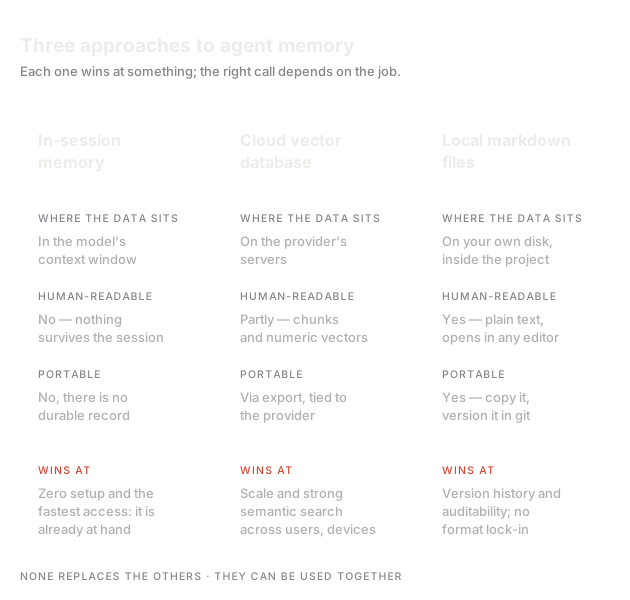
By criterion
| Criterion | Session summary | Cloud vector | Local markdown |
|---|---|---|---|
| Where the data sits | In the session context, not durable | On the provider's servers | On your disk and in your git |
| Readable by a human | Usually not, the summary is hidden | No, vectors do not read | Yes, plain text |
| Versioned in git | No | No, partly via export | Yes |
| Portable across tools | No | Partly, if there is an API | Yes, the format is shared |
| How search works | None, the last conversation carries over | Semantic, strong at volume | Text search and local embeddings |
| Works offline | No | No | Yes |
| Easy to correct | No, you re-explain | Delete the entry and re-embed | Yes, open the file and edit |
| Setup cost | Zero, it ships enabled | Service, schema and pipeline | Folder layout and writing discipline |
Where does Borje sit?
Borje sits in the third column: memory accumulates as plain markdown in the project's .borje/ folder, is versioned in git, and Claude Code, Codex, Antigravity and Copilot all read the same folder. Indexing and embedding run on the user's device, there are no LLM calls in the indexing loop, and only account verification reaches the server.
Who it is not for, stated plainly. The closed beta runs on Windows only; macOS is on the roadmap but not here today. The team and organizational layers have not shipped, so if you need shared memory with role-based permissions, Borje does not give you that today. If you need semantic search across an archive of hundreds of thousands of documents, the right tool is a vector database, not file-based memory. And if nothing gets recorded, no approach helps: memory only exists to the extent it is written.
Frequently asked
Can I combine the approaches?
Yes, and in practice that is the most common setup. Daily decisions and open work sit in local files, a separate vector search covers a large document archive, and session summarisation keeps doing whatever your tool does with it. They do not exclude each other; they solve different problems at different scales.
Is a vector database better than local markdown?
It depends on the question. If the material is thousands of documents and the wording does not match literally, vector search beats reading files. If what you are searching is one project's decision history, reading files is both more accurate and cheaper, and you can verify the record by eye. You are choosing between scale and verifiability.
How is local memory shared across a team?
Today the mechanism is git: because memory files live in the repository, the team clones them too, reviews changes and resolves conflicts like any other merge. A shared layer with role-based permissions is on Borje's roadmap and is not available today.
What happens to my memory if Borje shuts down?
The files stay with you. Memory is not in a locked format; it sits inside the project as plain markdown and is versioned in git history. You do not need Borje to read it: any text editor or another tool opens the same folder.
If the local markdown side is what you want to try
The Borje closed beta is Windows-only and free. Applications are approved by hand, one by one; if you actively work with AI CLI tools, you move up the list.