Guide
Claude Code memory: persistent project memory for AI coding agents
Claude Code, Codex, Copilot and every other AI coding agent starts each new session from zero. They do not remember the architecture you explained yesterday, the decision you made, or the reasoning behind it, because a session's context window is a temporary workspace rather than a durable memory. Persistent memory means a record that lives outside that window, on disk or in a service, and gets loaded again at the start of every session. This guide covers the three ways to build that record: in-session summarisation, a cloud vector database and local file-based memory. For each one it sets out where it works, what it costs and where it fails, as honestly as we can. At the end there is a tool-independent setup you can put in place today.
Why do AI coding assistants forget context every session?
They forget because the model keeps nothing between sessions. On each request a language model reads the text it is given, produces an answer and drops the state. A conversation feels continuous only because the earlier messages are resent with every request. Once the session closes there is nothing left to resend.
The second limit is the context window. The window is the total amount of text a model can hold at once, and it is fixed. In a long session, once it fills, tools trim or summarise the oldest part. The decision you made in the morning may have quietly fallen out by the afternoon.
The third is that the code does not carry the reasoning. The agent scans the codebase for minutes, sees what was done and cannot see why. That information was never written into any file.
Why isn't a bigger context window the same as memory?
A larger window buys a longer session, not durability. A million-token window still empties when the session closes. The window is capacity; memory is the record that survives the session. They solve different problems.
Filling the window has three concrete costs. Money: every token sent on every request is billed, and shipping an entire project history with each message is expensive. Latency: long requests answer slowly. Accuracy: in very long contexts models tend to overlook material sitting in the middle, and irrelevant text dilutes the signal.
What works in practice is the opposite move. You put into the window not everything, but what this task needs: recent decisions, open work, the relevant files. The thing doing that selection is memory, not the size of the window.
What approaches to persistent memory exist?
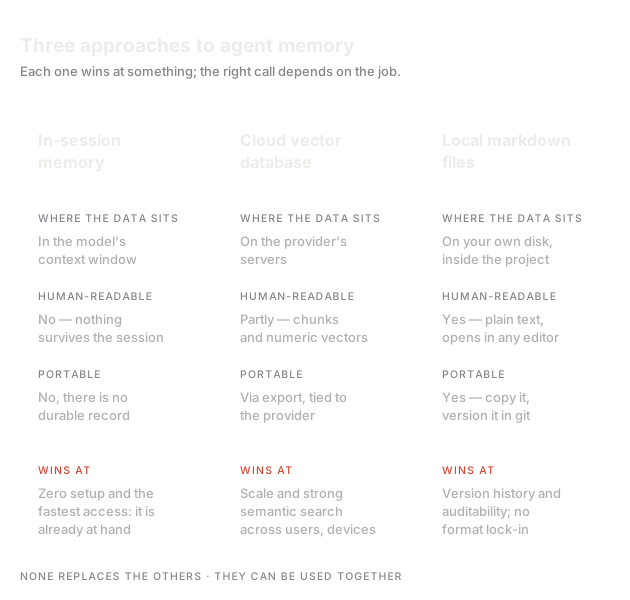
In practice there are three, and all three answer the same question: what is left when the session ends?
The first is in-session summarisation. The tool summarises the conversation and carries that summary into the next request. Setup cost is zero and most tools ship it by default.
The second is a cloud vector database. Conversations and documents are split into chunks, turned into embedding vectors and stored in a service; when the agent asks something, semantically close chunks are retrieved. It is strong at volume.
The third is local file-based memory. Decisions and context are written into plain markdown files inside the project, versioned in git and read at the start of each session.
The right answer is usually not one approach but a combination of two. Volume, privacy and the need to correct records decide which one dominates.
When is in-session summarisation enough?
It is enough to keep one long session standing. The tool compresses the conversation: when the context window fills, it keeps the summary and drops the detail. It is good at preserving the flow of the single task you are on today, and it requires no setup at all.
Its limits show up in two places. First, summarisation is lossy and you do not choose what gets dropped. The reasoning behind a decision can be classified as detail and vanish, and you only notice once the agent answers wrongly. Second, the summary is bound to the tool. A session summary in one tool does not travel to another; switching puts you back at zero.
There is also a visibility problem. You usually cannot read what the summary says. If a wrong inference made it in, every following session starts from that error, and there is no file to fix.
When do you actually need a cloud vector database?
When the material to search grows past what anyone can read. Thousands of documents, years of support tickets, long conversation archives: at that volume opening files does not work and semantic search does. Vector search finds the relevant chunk even when the words do not match literally, and that is a real and important advantage.
The cost lands in three places. Infrastructure: you now maintain a service, a schema and an embedding pipeline. Privacy: chunks leave the machine to be embedded, and in most setups project content reaches the provider's servers. Verifiability: you cannot inspect why a chunk came back, because vectors do not read.
For a single project's decision history it is usually overkill. Standing up a vector database to search fifteen markdown files adds more maintenance than it removes.
What does local file-based memory buy you?
Full control over the record. Memory sits in a folder inside the project; you open the files, you correct them, git versions them. You never guess what the agent knows, you look. If it is wrong you change the line, and the correction takes effect immediately.
The second gain is portability. The file format is not bound to a tool; Claude Code reads the same folder as Codex and Copilot. Switching tools stops being a memory-loss event.
It has limits too. Someone has to write the records, which takes discipline. As the file count grows the structure decays, stale entries pile up and cleanup becomes work. In very large archives plain text search is not enough and a layer such as local embeddings is needed. This approach is built on the right data rather than on a lot of data.
Why is markdown a portable memory format?
Because markdown is the smallest common denominator that a person and a machine can both read. It is plain text: it opens in any editor, greps, copies and travels by email. Reading it does not require any product to still be running.
Combined with git, memory becomes versioned. You can see when a record changed, who changed it and in which commit. A one-line correction reads as one line in the diff. Review, revert and branching come for free, because those are already git's job.
Finally, lock-in risk drops. If your tooling changes, a service shuts down or the team moves to another stack, the files stay where they are and read the same way. The value of memory accumulates over years, which makes long-term readability of the carrier more important than the elegance of the format.
What happens when memory rots?
A stale record is more dangerous than an empty one. If memory is empty the agent says it does not know and asks you. If memory holds a sentence that was true four months ago, the agent treats it as today's truth and builds work on top of it. The wrong answer goes unnoticed precisely because the source looks reliable.
Rot arrives in two typical ways. The first is undated writing: a line describing how the architecture currently works reads as current forever if nothing says when it was written. The second is the silent update: a new decision supersedes an old one, but the old record stays in place and search returns both.
The fix is two habits. Date every heading that asserts current truth. When a record stops being valid, mark it as superseded and point to the new one instead of deleting it.
What does sending project context to the cloud actually mean?
What goes to the cloud for memory is not just fragments of code. Decisions, architecture notes, internal service names, customer names, unresolved security issues and the reasons things were not done go with it. The most sensitive part of a project is usually not the code itself but the knowledge around the code.
For some teams that is fine, for others it is a contract breach. The questions to ask are concrete: which country holds the data, how long is it retained, is it used for model training, does a deletion request actually delete, who are the sub-processors.
Local processing removes a subset of those questions up front. If indexing and embedding run on the device, project content never goes over the network. That is where Borje sits: no LLM calls in the indexing loop, memory stays on the user's disk, and only account verification reaches the server.
How do you set up your own memory?
You can start with a tool-independent layout. Create a folder at the root of the project and put three files in it: a short status file describing what is being worked on now, a decision file accumulating decisions with their reasoning, and a task file holding open work. Tell your agent to read those three files at the start of every session.
Deciding what to record is easier than deciding what to leave out. Record: a decision and its reasoning, a path tried and abandoned and why, constraints of the system that are invisible from outside. Do not record: things the code already says, transient error output, whole session transcripts.
Keep the status file short; one screen is a good limit. Anything longer moves into topic files. Date every heading. When a record stops being true, correct it rather than letting it pile up. Maintaining memory is as much work as having it.
In short
- 1A context window is a temporary workspace, not memory.
- 2Enlarging the window raises cost and latency without adding durability.
- 3In-session summarisation is free, but it is lossy and bound to one tool.
- 4A vector database genuinely wins on large archives and is overkill for one project's decision history.
- 5Local markdown is the easiest memory to correct, because the record is readable, versionable and portable.
- 6An undated record that was never superseded turns into a wrong answer over time.
Frequently asked
Isn't Claude Code's own memory file enough?
For a lot of work it is a good start. An instruction file at the project root carries the fixed information the agent reads every session. Its limit is that the file is updated by hand and grows over time: if nobody writes to it, it goes stale; if everybody does, it swells until nobody reads it. Persistent memory means a maintained set of records living alongside that file.
Should I commit memory files to git?
Usually yes. Decision records are part of the project and versioning them pays off: you can see when something changed, revert it and review it as a team. The exception is sensitive content. Credentials, customer data or notes that must not be shared should never enter a memory file, and if they did, they need removing before the commit.
I use several AI tools. Does memory travel between them?
It travels if the record sits in plain files. Whichever tool opens the folder can read it, because no proprietary format is involved. Tool-embedded session summaries or a provider-bound memory service do not travel: you have to rebuild the context in every tool.
How long should a memory file be?
The file describing the current state should be short, and one screen is a good limit. Long explanations belong in topic files, history belongs in session and decision records. The reason is simple: the longer the text read at the start of every session, the higher the cost and the easier it is for the important line to get lost in the crowd.
If you would rather not wire this up by hand
Borje runs the same layout automatically for AI CLI tools: decisions and context accumulate as plain markdown in the project's .borje/ folder, indexing runs on your device, and every session starts with the context already loaded. The closed beta is Windows-only and free; applications are approved by hand, one by one.